
Illumination brightness control
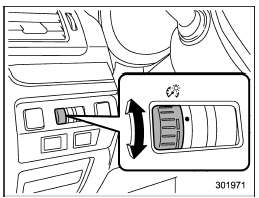
The illumination brightness of the instrument panel dims under the following conditions.
●
when the light switch is in the 
or
 position
● when the light control switch is in the
“AUTO” position and the headlights illuminate
automatically (models with auto on/
off headlights: Refer to “Headlights” F3-
89.)
You can also adjust the illumination brightness
for better visibility in the following
ways.
To brighten, turn the control dial upward.
To darken, turn the control dial downward.
NOTE
● When the control dial is turned fully upward, the illumination brightness becomes the maximum and the automatic dimming function does not work at all.
● The brightness setting is not canceled even when the ignition switch is turned to the “LOCK”/“OFF” position.