
Display selection
Subaru Forester / Subaru Forester 2012-2026 Owners Manual / Audio / CD player operation / Display selection
If you press the “TEXT” button during playback, the display will change as shown in the following sequence.
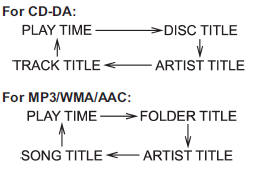
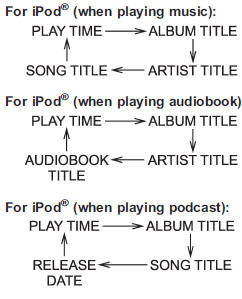
Page (track/folder title) scroll
If you press the “TEXT” button again and hold it, the title will be scrolled so you can see all of it.
NOTE
● The display is designed to show titles of up to 24 characters.
● If no operations are performed for 10 seconds, the screen that was displayed before pressing and holding the “TEXT” button will be shown.